Minuttes Cron
A remote cron trigger that ensures your WordPress scheduled tasks run reliably.
The Problem with WP-Cron
WordPress has a built-in task scheduler called WP-Cron. Unlike a real system cron, WP-Cron is lazy — it only checks for due tasks when someone visits your site. On low-traffic sites, jobs like WooCommerce subscription renewals, Action Scheduler queues, and email notifications can be delayed by minutes or hours.
The standard fix is a system cron hitting wp-cron.php every minute. Many shared hosts don't offer this, and system crons can silently break after server migrations.
How Minuttes Cron Works
Minuttes Cron sends a request to your site's wp-cron.php at a configurable interval (every 1, 5, or 15 minutes). Same mechanism as a system cron, but managed from the Minuttes platform with full visibility.
- Additive only — WP-Cron and any existing system cron continue to work. Minuttes Cron is an additional trigger, not a replacement.
- No plugin changes — Hits the standard
wp-cron.phpendpoint. - No authentication required —
wp-cron.phpis a public WordPress file. Does not use your OAuth connection. - Full transparency — Every trigger is logged with HTTP response code, timing, and failure count.
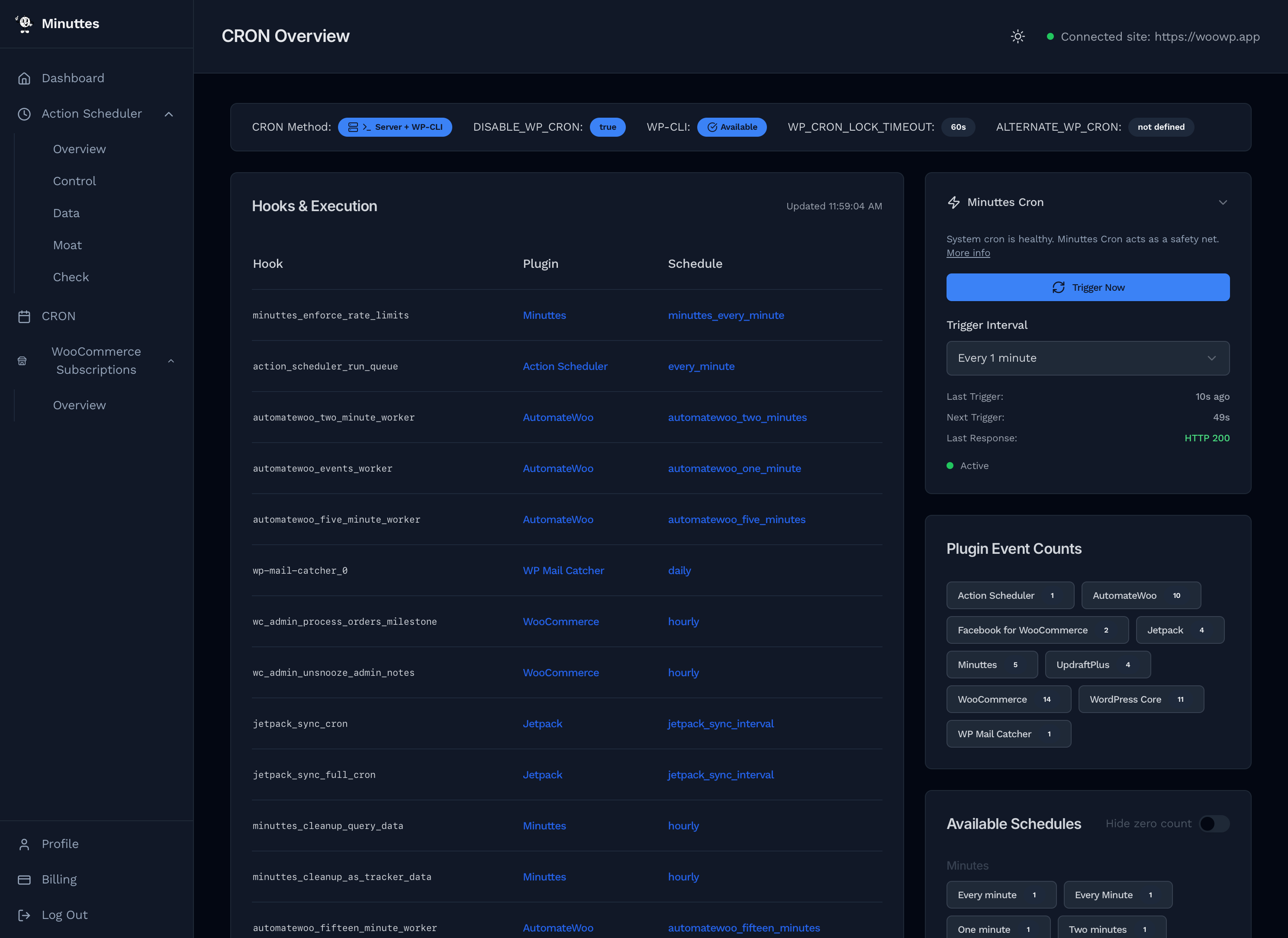
CRON Method (1)
The badge row (1) at the top shows how your site's cron is configured. Badges include WP_CRON, DISABLE_WP_CRON, WP-CLI, WP_CRON_LOCK_TIMEOUT, and whether ALTERNATE_WP_CRON is defined. Red badges flag potential issues.
Hooks & Execution (2)
The main table (2) lists every registered cron hook on your site.
| Column | Description |
|---|---|
| Hook | The WordPress hook name. |
| Plugin | Auto-detected source plugin. Shows “-” for unrecognised hooks. |
| Schedule | Recurrence interval (e.g. daily, hourly, twicedaily). |
| Next Run | Relative time until next execution. |
| Count | Number of scheduled instances for this hook. |
Minuttes Cron Panel (3)
The sidebar panel (3) controls the remote cron trigger. If WordPress relies on WP_CRON only, a recommendation banner suggests enabling Minuttes Cron.
Setting It Up
- Go to CRON → Overview in your dashboard
- Find the Minuttes Cron panel in the sidebar
- Select an interval (1 minute recommended)
- Triggers start immediately
Use Trigger Now to fire a one-off trigger at any time.
Monitoring
The panel shows real-time status:
- Last Trigger — When the last request was sent.
- Next Trigger — Countdown to the next request.
- Last Response — HTTP status code (200 = success).
- Consecutive Failures — Shown if triggers are failing.
- Status indicator — Green (active), gray (disabled), red (failing).
Plugin Event Counts (4)
The Plugin Event Counts panel (4) groups cron hooks by their source plugin. Filter badges let you see how many hooks each plugin has registered (e.g. Action Scheduler, WooCommerce, WordPress Core).
Available Schedules (5)
The Available Schedules panel (5) lists every cron recurrence interval registered on your site, grouped by frequency. Includes standard WordPress schedules (hourly, daily) and custom intervals added by plugins.
When to Enable Minuttes Cron
| Your Setup | Benefit |
|---|---|
| No system cron (shared hosting) | High — Ensures jobs run on schedule regardless of traffic. |
| System cron exists but health shows warnings | Medium — Adds redundancy if the system cron fails. |
| Healthy system cron running every minute | Low — Safety net if the system cron breaks. |
FAQ
Does this replace WP-Cron?
No. Minuttes Cron is additive. WP-Cron continues to function normally. If Minuttes Cron stops, WP-Cron picks up on the next site visit.
Will this add load to my site?
Minimal. Each trigger is a single lightweight request to wp-cron.php, typically under 100ms. At most, one extra request per minute.
What if my site is behind HTTP authentication?
The trigger will receive a 401 or 403. Whitelist the Minuttes server IP or disable HTTP auth for wp-cron.php.
Can I use this without Action Scheduler?
Yes. Minuttes Cron triggers all WP-Cron jobs — WooCommerce, Jetpack, UpdraftPlus, etc.