Action Scheduler Overview
Monitor and manage your WordPress Action Scheduler queue from a single dashboard.
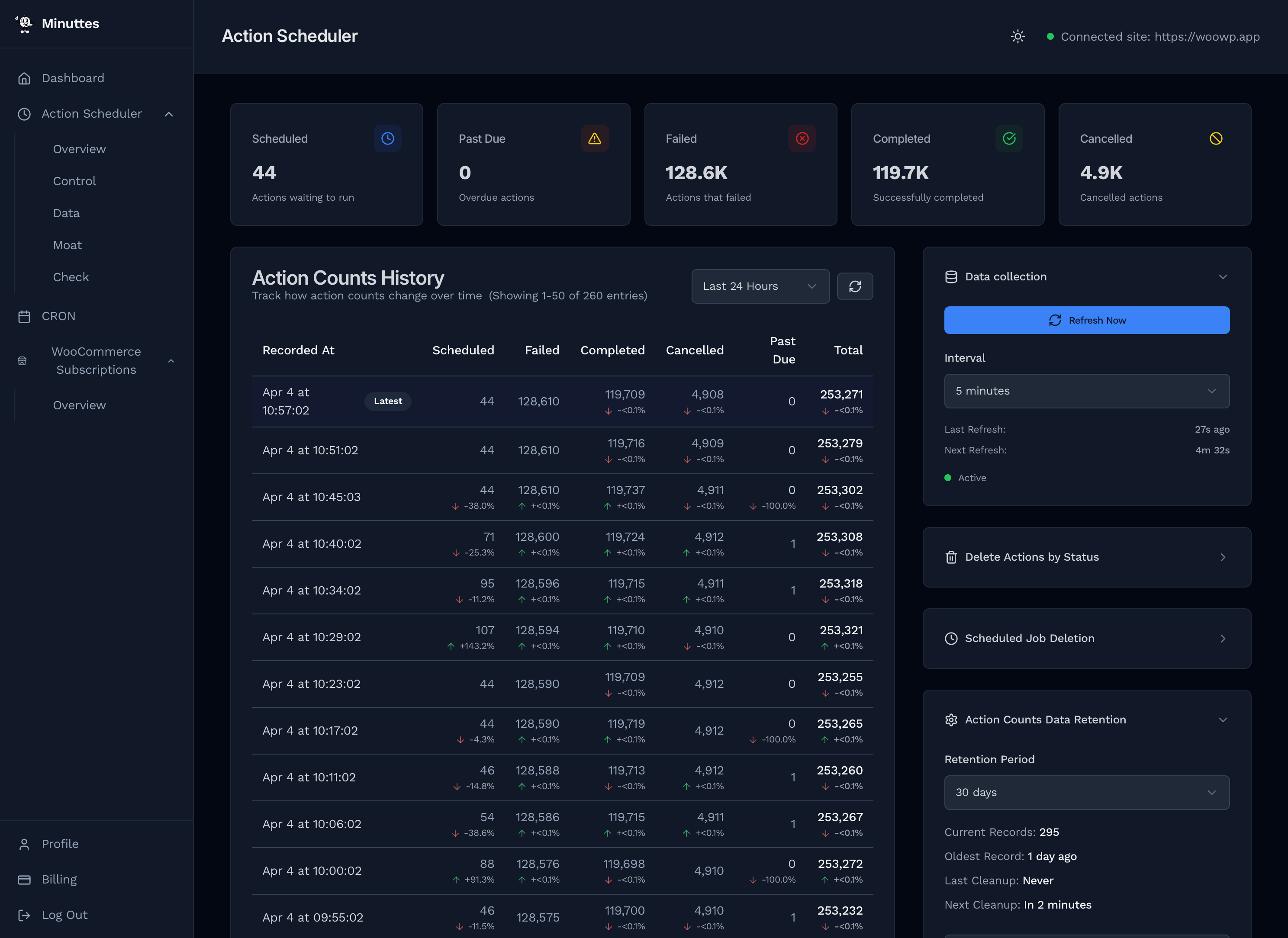
Status Cards
Five cards at the top provide an at-a-glance summary of the current queue state. Each card shows a count and a color-coded icon.
| Card | What It Shows |
|---|---|
| Scheduled | Actions waiting to run at their scheduled time. |
| Past Due | Actions that missed their scheduled time. Non-zero indicates cron or processing delays. |
| Failed | Actions that threw an error during execution. |
| Completed | Successfully executed actions. Large numbers are normal. |
| Cancelled | Actions cancelled before execution, typically by plugin logic. |
Large numbers are abbreviated automatically (e.g. 5,100 shows as 5.1K).
Action Counts History
The main table tracks how action counts change over time. Each row is a snapshot recorded at the interval you configure in the Data Collection panel.
Columns
- Recorded At — Timestamp of the snapshot. The most recent row is highlighted and marked Latest.
- Scheduled, Failed, Completed, Cancelled, Past Due — Count for each status at that point in time.
- Total — Sum of all action counts.
Percentage Changes
Below each count, a small arrow and percentage show the change from the previous snapshot. Green arrows indicate an increase, red arrows a decrease. Makes it easy to spot spikes in failures or sudden drops.
Time Range Filter
Use the dropdown in the table header to filter snapshots:
- Last Hour
- Last 6 Hours
- Last 24 Hours (default)
- Last 7 Days
- Last 30 Days
Pagination
The table paginates when there are many snapshots:
- Page size: 25, 50, 100, or 200 per page
- Jump to a specific page number
- Previous / Next navigation
Average Counts
Below the table, an averages row shows the mean count for each status across the selected time range.
Deletion Indicators
Rows where an automatic deletion occurred are outlined in purple with a trash icon. Hover the icon to see the deletion status and how many actions were removed.
Data Collection
The Data Collection panel in the sidebar controls how often Minuttes records a snapshot of your action counts.
- Refresh Now — Trigger an immediate snapshot.
- Interval — Collection frequency: 30 seconds, 1 minute, 5 minutes, 10 minutes, or Off.
- Last Refresh — Time since the last snapshot.
- Next Refresh — Countdown to the next automatic snapshot.
Scheduled Job Deletion
The Scheduled Job Deletion panel automates recurring cleanup. Each schedule targets a specific action status and runs at a fixed interval.
Creating a Schedule
- Click Add Schedule
- Select the status to delete (Completed, Failed, or Cancelled)
- Choose an interval: every 24 hours, 7 days, 14 days, or 30 days
- Set a deletion limit or check Delete all
Managing Schedules
Each active schedule shows:
- Status badge and interval
- Actions — Current count matching this status
- Next — Countdown to next execution
- Limit — Actions to delete per run, or "All"
- Last — When it last ran
You can pause/resume, delete, or run immediately any schedule.
Data Retention
The Data Retention panel controls how long history snapshots are kept. Set a retention period (e.g. 30 days) and older snapshots are automatically purged.
- Current Records — Total snapshots stored
- Oldest Record — Date of the earliest snapshot
- Last Cleanup — When retention cleanup last ran
- Next Cleanup — Countdown to next cleanup
Use Purge all data to immediately delete all history if needed.
FAQ
How often should I collect data?
5 minutes works well for most sites. Use 30 seconds or 1 minute for granular visibility during active debugging. Use 10 minutes or Off for low-priority sites.
What does "Past Due" mean?
Scheduled tasks that should have run but haven't. Common causes: WP-Cron not firing reliably, high server load, or too many actions queued. See the Minuttes Cron docs for improving cron reliability.
Should I delete completed and failed actions?
Yes, periodically. WooCommerce and other plugins accumulate tens of thousands of completed and failed actions that bloat wp_actionscheduler_actions. Failed actions rarely need to be retained once investigated, and completed actions serve no ongoing purpose. Use Scheduled Job Deletion to automate cleanup for both — every 7 or 30 days keeps the database lean.
What happens during a deletion?
Deletions run in the background on your WordPress site. The history table marks the snapshot where a deletion occurred with a purple indicator showing how many actions were removed.